
My AI-First Website
Why I chose a minimal Astro site based on Markdown and Git, designed to work well with Codex while staying fast, simple, and almost free to run today.
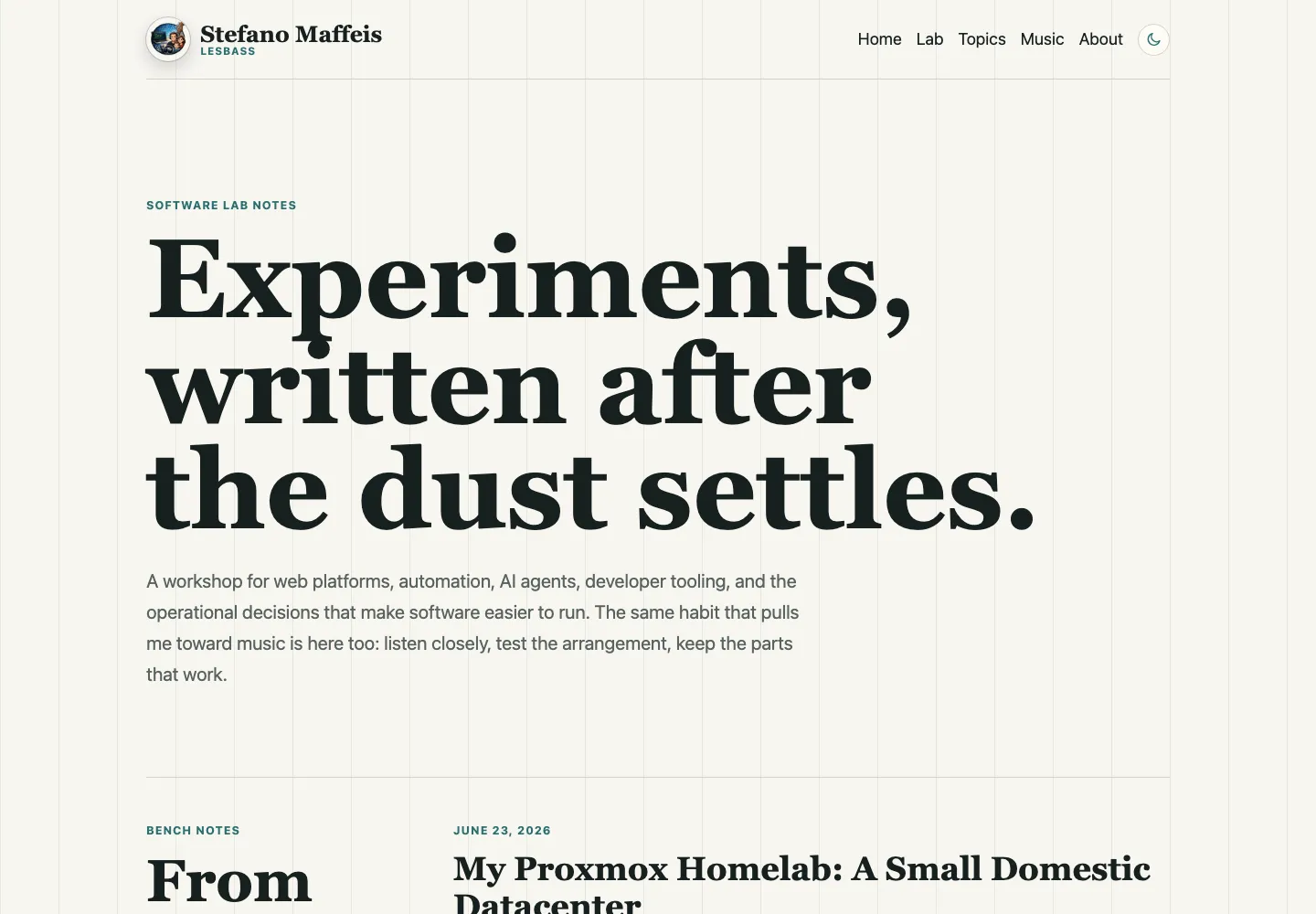
I have built websites in more traditional ways before.
I have used WordPress. I have used Umbraco, a CMS I have loved a lot over the years, including for projects such as dillosulweb.it. I still think a good CMS solves real problems: backoffice editing, content types, media libraries, editorial workflows, previews, permissions, roles, and extensibility.
For this site, though, I wanted to try a different direction.
This site needed something smaller than a backoffice, database, plugin ecosystem, theme system, login area, and application server:
- write technical articles as versioned files;
- keep the full history in Git;
- make the site fast by default;
- keep hosting costs close to zero;
- make the project simple enough for Codex to work on comfortably.
This website is both a publishing surface and a working environment. I want to be able to ask Codex to inspect the content model, import a draft, fix SEO metadata, check sitemap and canonical behavior, add screenshots, or write an article from repository notes.
For that to work well, the site has to be readable by a coding agent.
I wrote more about the personal side of that workflow in AI Agents Are Making Me a Better Programmer.
In that sense, this is a coding-agent-first website. Visitors see no chat widget, generative interface, or AI-powered effect. The distinction is in how the site is built: the source is clear, textual, versioned, testable, and editable by a coding agent without going through hidden admin screens.
From CMS-first to Git-first
WordPress and Umbraco are powerful tools.
If I were building a site for a non-technical editorial team, a complex multilingual project, a portal with many editors, or a product where the backoffice is central to the workflow, I would still consider a CMS seriously.
But this personal site has a different shape.
The author, editor, developer, and operator are the same person. Most articles start from real work: a local repository, a configuration issue, a deployment problem, an Umbraco feature, a homelab experiment, or an AI-agent workflow.
In this context, a traditional CMS can become extra surface area:
- content lives in a database instead of next to the code;
- backups and migrations become part of the editorial story;
- plugins, upgrades, and dependencies become operational work;
- the final HTML depends on runtime state and configuration;
- an agent has to talk to APIs or admin screens instead of editing files directly.
None of that is wrong in general. It was simply more than this site needed.
For this site, Markdown, Git, and static HTML are enough.
There is also a practical reason: working with coding agents has made me very comfortable with Markdown files. It now feels natural to treat an article as a file: open it, edit it, version it, move it, review it, and let Codex transform it when useful.
For long, technical, mostly linear editorial content, that workflow is very comfortable.
I would not call it a website-management model for the average person.
For many people, opening a Markdown file, editing it, committing it, waiting for a build, and verifying a deployment is unnecessarily technical. An admin panel with fields, preview, and a publish button is more immediate.
For me, as a developer, the opposite is true. Git, an editor, the terminal, and pull requests are already part of my daily environment. Managing the site the same way I manage code does not feel like extra friction. It feels simpler.
The structured-content question
There is one important limit I have not fully tested yet: deeply structured content.
In Umbraco, for example, I have used pages made of content bands. Each band can be its own block type: hero, grid, card set, call to action, editorial section, gallery, product block, nested configuration, or something more specific to the site.
Sometimes each block has a complex internal structure, with variants, validation rules, nested fields, and editor-facing constraints.
Replicating that model here is not impossible, but it would no longer be the simple case of “write Markdown and publish”.
Astro can handle structured content in several ways: more typed content collections, JSON or YAML data files, MDX components, or pages built from explicit data structures. But a real visual block-based page builder, with comfortable editorial editing and validation, is exactly the kind of feature where a CMS like Umbraco remains strong.
So for now I consider this site well suited to a technical writing archive, not to a complex composable portal.
The stack
The stack is intentionally boring:
- Astro for static site generation;
- Markdown content collections for articles;
- local images stored next to each post;
@astrojs/rssfor the feed;@astrojs/sitemapfor the sitemap;- plain CSS for the visual system;
- GitHub Actions for validation;
- Cloudflare Pages for deployment.
There is no application server in production. The build generates static files, and Cloudflare serves them.
The operational flow is small:
Markdown + Astro source
        |
        v
Git commit / pull request
        |
        v
CI validation
        |
        v
Astro static build
        |
        v
Cloudflare Pages CDN
The site structure is simple too:
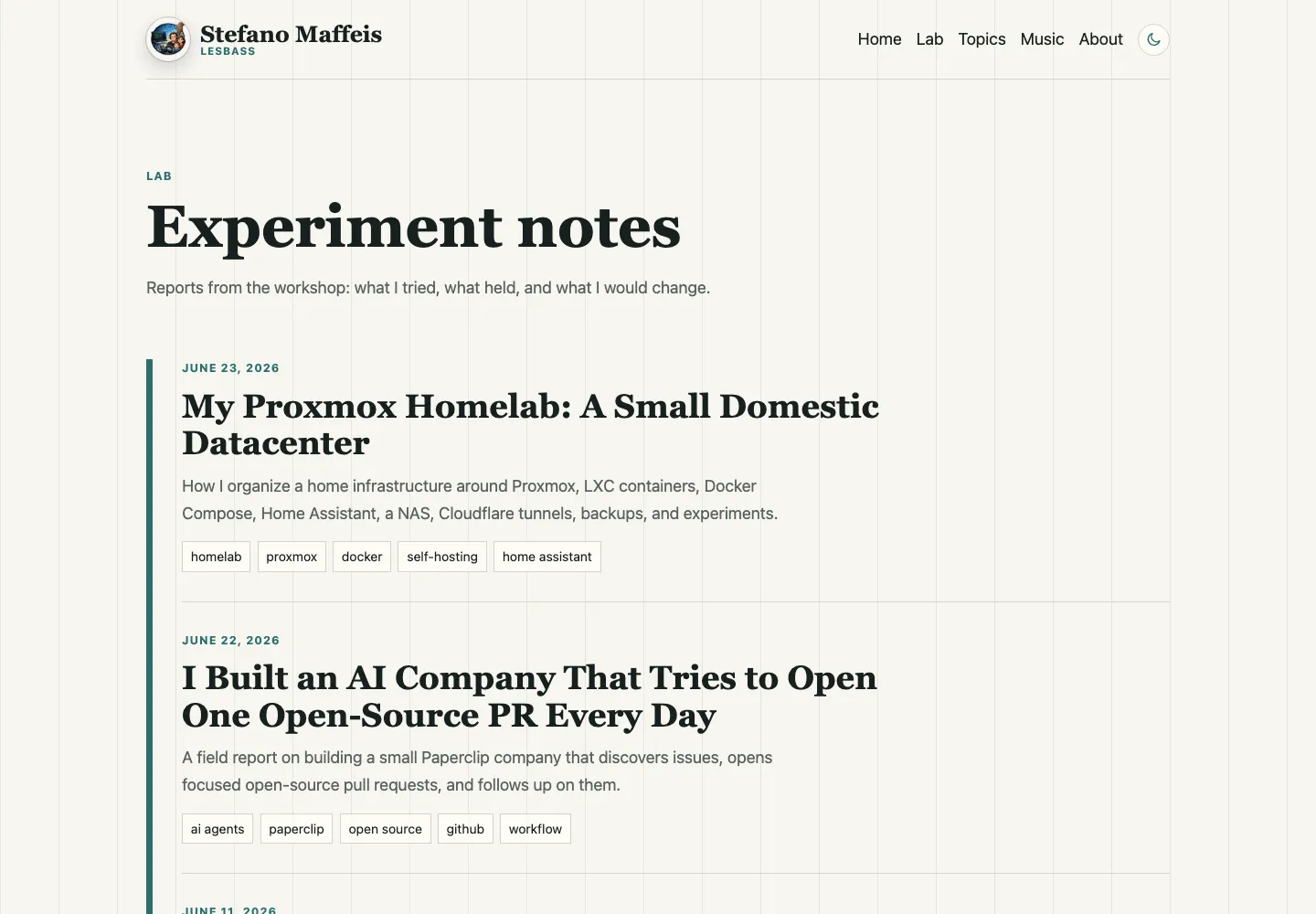
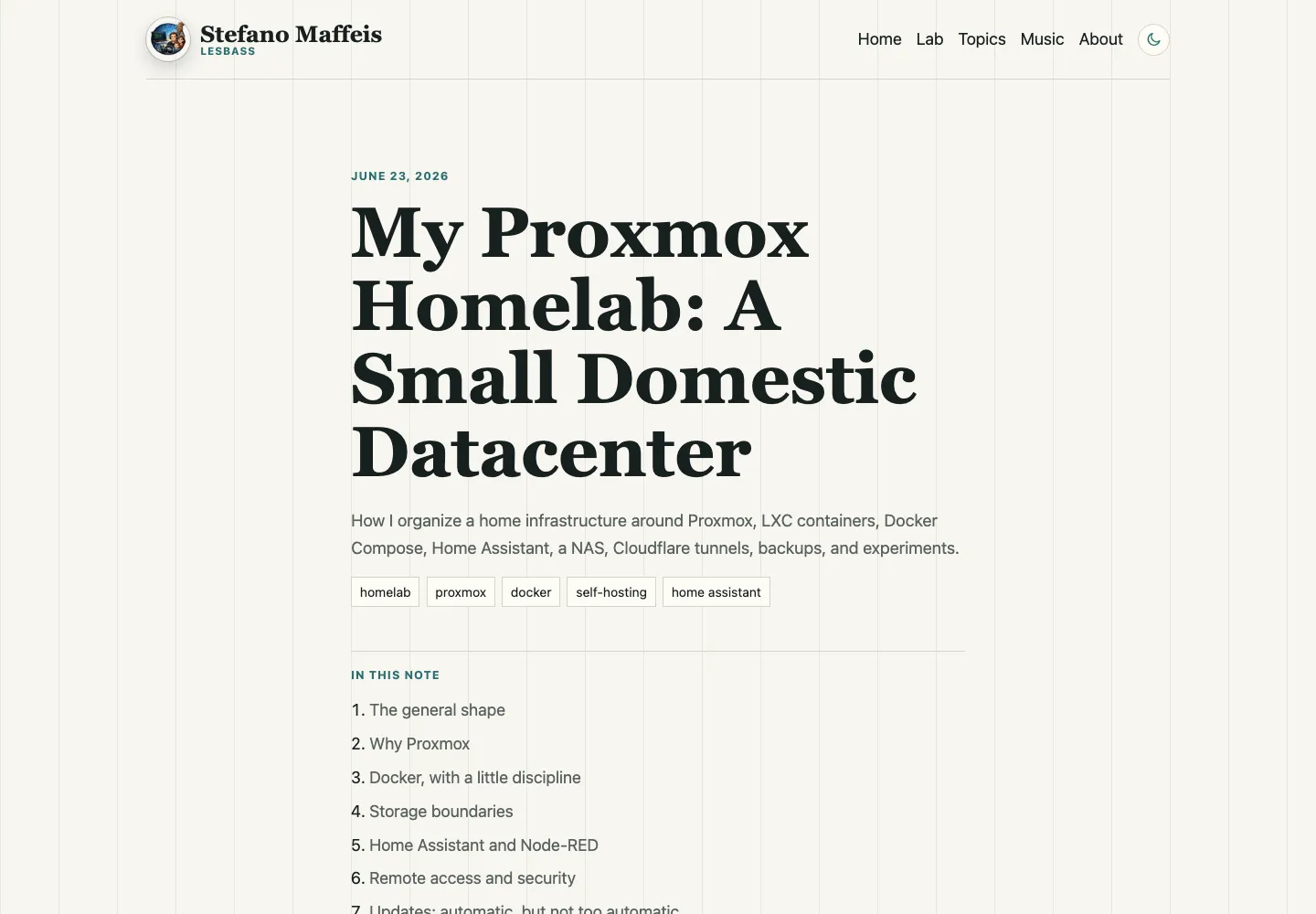
/for the homepage;/about/for the profile page;/lab/for the article archive;/lab/[slug]/for individual posts;/topics/and/topics/[topic]/for topic navigation;/rss.xml,robots.txt, and the generated sitemap for feeds and crawlers.
Why Astro fits
Astro works well here because it does not force the site to be more dynamic than it needs to be.
Each article is a directory under content/lab/, with an index.md file and optional local images in the same folder. The frontmatter contains the important metadata:
title: "Article title"
seoTitle: "Shorter SEO title"
description: "Description for search and social previews."
pubDate: 2026-06-24
draft: true
tags: ["astro", "codex", "cloudflare"]
cover: "./screenshot-home.png"
coverAlt: "Specific description of the image."
This model is easy to inspect.
When I want to review an article, I review a diff. When I want to go back, I use Git. When I want Codex to import a draft, Codex creates a directory, writes Markdown, adds local images, and runs the build. When I want to improve metadata, the schema is visible in the repository.
There is no hidden editorial state.
Why it works well with Codex
A Git-first project is comfortable for Codex because almost everything is text.
Codex can read the content schema, route structure, SEO component, RSS generation, sitemap configuration, existing article style, and actual Markdown posts. Then it can make a targeted change and validate it with the same commands I use locally.
A weak prompt would be:
Make my website better.A much better prompt is:
Inspect this Astro site and find SEO issues in the generated output.
Build the site, start a local preview, check sitemap, robots.txt,
canonicals, article metadata, JSON-LD, internal links, and image attributes.
Write the findings to docs/seo-audit-YYYY-MM-DD.md.
That works because the project is small and explicit. Codex does not need to infer a CMS configuration from a database or an admin panel. It can read the source, generate the site, inspect the final HTML, and save a durable report in the repository.
Another useful prompt for publishing work is:
Create a draft article under content/lab/.
Use the existing frontmatter schema and article style.
Keep draft: true.
Place local images next to index.md.
Run npm run build and fix any content or type errors.
For migration or cleanup work:
Find public references to the old publishing platform.
Remove them from visible copy, metadata, RSS, and public docs unless they are
needed as private migration notes.
Run the build and report exactly what changed.
The interesting part is that Codex is not just producing text. It works on the repository as the real artifact.
Performance by subtraction
The performance strategy is mostly subtraction.
The site ships no large JavaScript application, client-side article renderer, database query for the homepage, or application server for each visit.
Astro generates pages ahead of time. Cloudflare serves static assets from the edge. Images live next to articles and are handled during the build. CSS stays small because the design is centered on reading, not on a heavy interface.
This is a product decision. Static files keep requests fast, cheap, and independent of an application runtime.
SEO Inside the Build
This project includes:
- unique titles and descriptions;
- canonical URLs;
- Open Graph and Twitter metadata;
- JSON-LD for articles;
- structured data for profile and author context;
- RSS;
- sitemap generation;
robots.txt;- clean URLs under
/lab/; - alt text and dimensions for local images.
The difference is that all of this can be validated as part of the repository.
The local flow is:
npm run lint
npm run check
npm run build
npm run preview
Then I inspect the generated output, not just the source. That detail matters: many SEO issues live in final HTML, sitemap entries, redirects, and canonical behavior, not in the component I happen to be editing.
Deployment at almost zero cost
Deployment runs through Cloudflare Pages.
The production model is:
- change files in the repository;
- commit or open a pull request;
- GitHub Actions validates linting, Astro checks, and the static build;
- Cloudflare Pages publishes the output;
- Cloudflare serves the site.
For a personal technical writing site, that combination is very practical.
The website needs no VPS, database plan, CMS hosting plan, or always-on container for anonymous readers.
The recurring cost is basically the domain name, plus any optional services I decide to add later.
Cloudflare Web Analytics can also be enabled from the Pages project without committing analytics tokens or snippets into the repository. That keeps the source cleaner.
Useful screenshots
For an article like this, screenshots should show the system:
- the homepage, to show the editorial positioning;
- the Lab page, to show article organization;
- an article page, to show the Markdown output;
- optionally, a repository view of
content/lab/; - optionally, the Cloudflare Pages deployment screen after a successful build.
I would avoid generic screenshots of logos or dashboards. The point is to show that the site is simple, inspectable, and real.
Prompts I would use again
The first version of the site is small, but it is not a dead end.
Useful next prompts would be:
Review the generated sitemap and make sure it contains only canonical,
indexable URLs. If compatibility pages exist, move redirects to Cloudflare
Pages _redirects and exclude those URLs from the sitemap.
Use the post cover image for Open Graph and Twitter metadata when present.
Keep the default social card as fallback.
Validate the generated HTML.Add a related-posts block to Lab articles using shared tags.
Keep it static, accessible, and visually quiet.Evaluate whether the global CSS should move to SCSS/Sass.
Keep plain CSS if the design remains small, but consider Sass if the visual
system grows enough to benefit from variables, partials, and clearer nesting.Turn this draft into a publishable article:
check frontmatter, tighten the introduction, verify links, suggest screenshots,
and keep the tone consistent with the existing Lab posts.These prompts work because the project has clear boundaries. It is a small static site, not a pile of hidden state.
The Tradeoff
The minimal approach gives up browser-based editing, roles and permissions, a media library, and non-technical editorial workflows.
For this site, that is acceptable.
In exchange, I get a site that is fast, cheap to host, versionable, easy to inspect, and comfortable to automate with Codex.
That is the shape I wanted: a personal lab where writing, code, SEO, deployment, and automation live in the same repository.
References
- WordPress: https://wordpress.org/
- Umbraco: https://umbraco.com/
- Astro: https://astro.build/
- Astro content collections: https://docs.astro.build/en/guides/content-collections/
- Cloudflare Pages: https://pages.cloudflare.com/
- Cloudflare Web Analytics: https://www.cloudflare.com/web-analytics/
- Git: https://git-scm.com/
- GitHub Actions: https://github.com/features/actions
Share