
I Built a Multi-Agent Travel Planner with n8n
A field report on turning family road-trip planning into a small n8n organization of specialized AI agents, shared memory, and travel-specific knowledge bases.
Planning a road trip is a coordination problem disguised as a list of places.
You have dates, hotels, driving time, fuel, food, weather, children, fatigue, famous places you do not want to miss, less obvious places you hope to discover, and the small emotional layer that turns a route into a trip.
A single chatbot can answer a question like:
Plan a day between these two cities.But that answer tends to flatten the problem.
It mixes logistics, sightseeing, family constraints, hotel information, and taste into one confident block of text. Sometimes that is enough. For this trip, I wanted something more structured.
So I built a small multi-agent travel planner in n8n.
It sits in the same family of experiments as One PR a Day, with a workflow where agents have roles, tools, and boundaries.
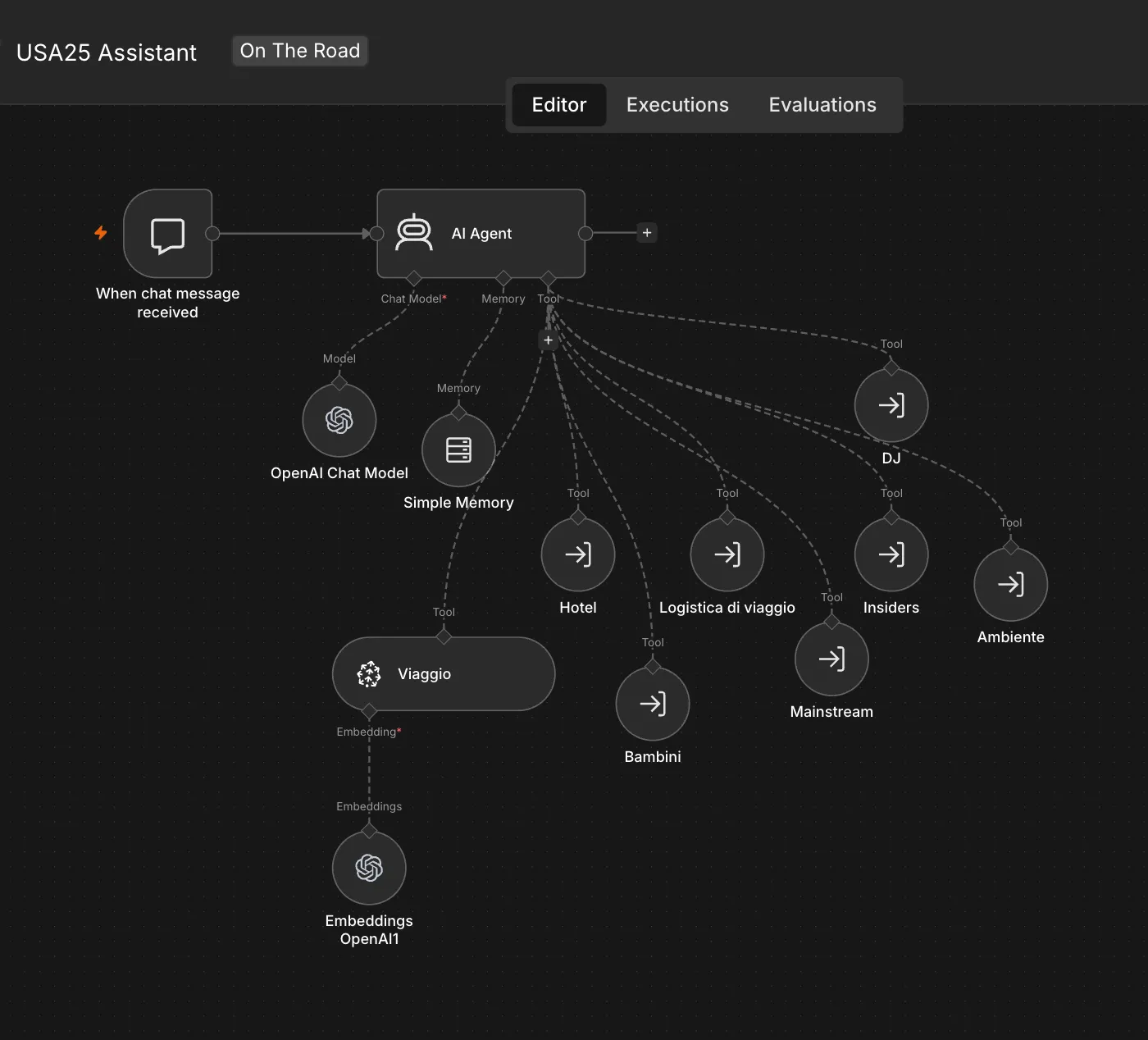
I called the main workflow USA25 Assistant.
The Entry Point
The entry point is a chat workflow.
The user asks for the itinerary of a specific day. The central agent receives the request, looks up the travel plan, and delegates parts of the work to specialist agents.
The shape of the workflow matters more than the individual nodes.
There is a central AI Agent node, but it is not supposed to be a genius travel oracle. It has a narrow job: orchestrate the planning of one day.
Around it there are a model, memory, a travel knowledge base, and seven tools:
HotelTravel LogisticsMain AttractionsLocal InsiderRoad DJEnvironmentChildren
Each of those tools is another n8n workflow.
I like that the system behaves as a small organization instead of an AI agent carrying one long prompt.
Why Not Use One Big Prompt?
The obvious first version would have been a single prompt:
You are an expert travel planner. Plan this day for a family road trip in the USA.That works surprisingly well for generic travel advice.
It is less convincing when the question depends on separate kinds of context.
Hotel information is not the same as sightseeing advice. Rental car logistics are not the same as child-friendly pacing. Weather and fuel planning are not the same as choosing a nice local stop. A playlist is not the same as a route.
When all of that lives in one prompt, the model has to pretend that every concern has the same shape.
I wanted the opposite.
I wanted the workflow to make the concerns visible.
The Orchestrator
The main agent has one strict responsibility: propose the itinerary for a specific day.
It is explicitly instructed to ignore other kinds of requests. If I ask something unrelated to a day itinerary, it should refuse and stay inside its role.
That may sound restrictive, but it is one of the reasons the workflow works as a system.
The orchestrator is also given an order of operations:
- identify the locations and planned stops for the day from the travel plan;
- ask
Main AttractionsandLocal Insiderfor points of interest; - ask
Childrenwhich options make sense for the family, then askTravel Logisticsto shape the route; - ask
Hotelfor departure and arrival accommodation details; - ask
Road DJfor music; - ask
Environmentfor weather, supplies, clothing, and practical road advice.
That order is important.
The workflow encodes a planning procedure, not just a personality.
This is where n8n becomes useful as more than an automation canvas. It gives the agent a visible operating model. I can look at the workflow and understand what the system is allowed to call, what kind of context it can retrieve, and where each responsibility lives.
The Specialists
The specialist agents are intentionally simple.
Main Attractions acts like a classic travel guide. It suggests the famous places, landmarks, museums, parks, and iconic stops that are easy to miss only if you are trying too hard to be original.
Local Insider has the opposite job. It looks for local details: viewpoints, small stops, markets, restaurants, curiosities, and less obvious places that make the day feel less like a checklist.
Children evaluates the day from the point of view of children aged 8 and 10. Its job is not to make the whole trip childish. Its job is to protect the rhythm: breaks, interactive stops, parks, realistic attention spans, and alternatives when a day becomes too heavy.
Travel Logistics owns the travel mechanics: flights, rental car, insurance, pickup and drop-off, and practical transport constraints.
Hotel owns accommodations: where the day starts, where it ends, check-in and check-out information, breakfast, cancellation notes, and useful lodging details.
Environment thinks about the road itself: weather, clothing, fuel, food, isolated stretches, and whether a specific day needs more preparation.
Road DJ is the least necessary and probably the most human part of the system. Every day it suggests two songs: one American song connected to the place or a local artist, and one Italian song that matches the mood of the day.
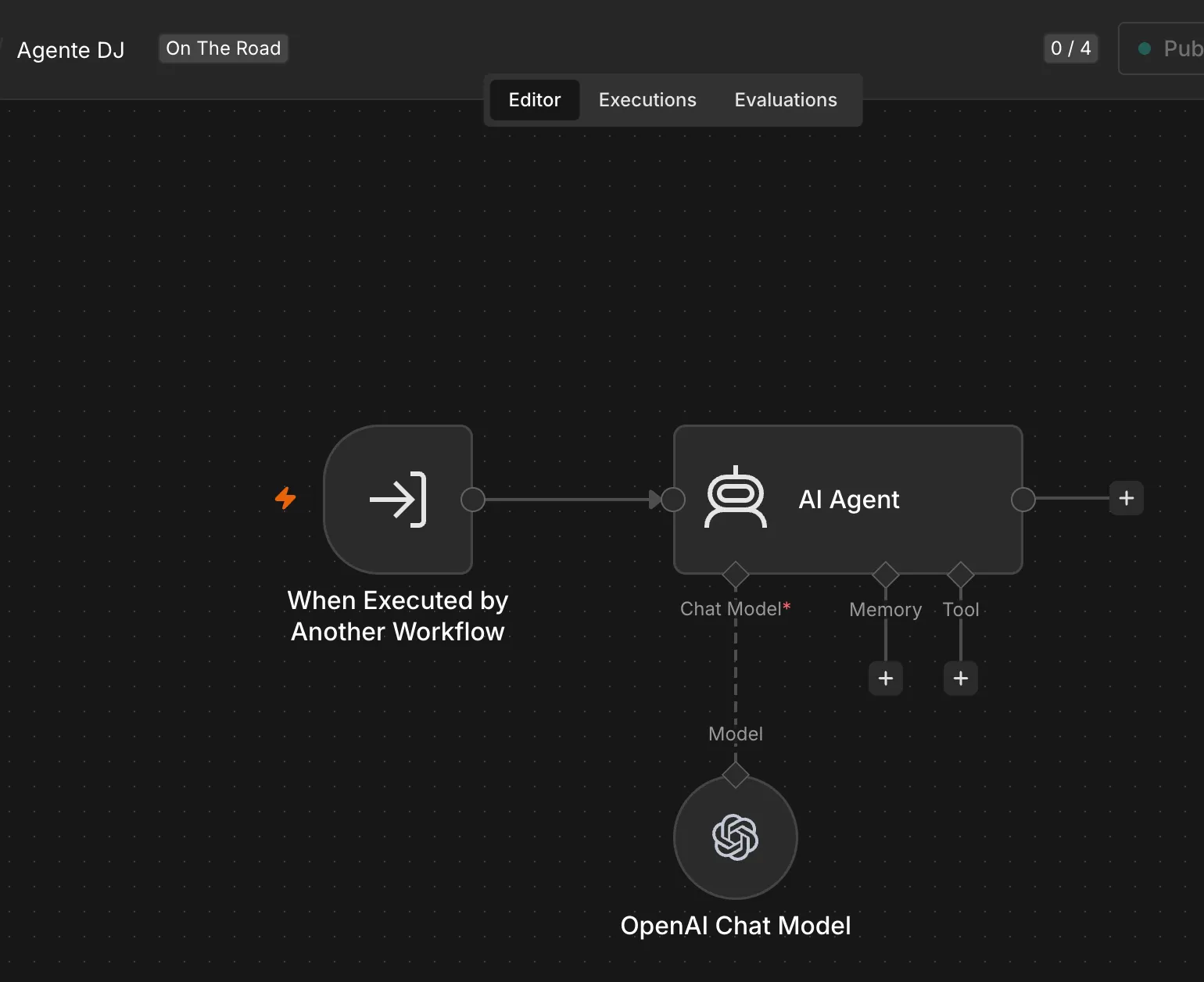
Some specialists do not need a retrieval layer or extra tools. The Road DJ workflow is deliberately small: it receives a focused prompt from the orchestrator and returns a focused answer.
That last agent is optional, but it gives the itinerary some personality.
Pinecone as the Retrieval Layer
The workflow uses Pinecone for retrieval.
In practice, this is the RAG part of the system.
Pinecone is not the whole RAG setup by itself. It is the vector store and retrieval layer. OpenAI embeddings turn the travel documents into vectors, Pinecone stores and searches them, and n8n passes the retrieved context back to the agent before it writes the itinerary.
The central assistant has access to a Travel Plan index that represents the complete itinerary. There is also an ingest path from Google Drive into Pinecone, so the travel plan can be updated from documents instead of being pasted into a prompt.
Some specialists have their own retrieval context.
Hotel can retrieve from Bookings and Travel Plan.
Travel Logistics can retrieve from Flight, Rental Car, and Insurance.
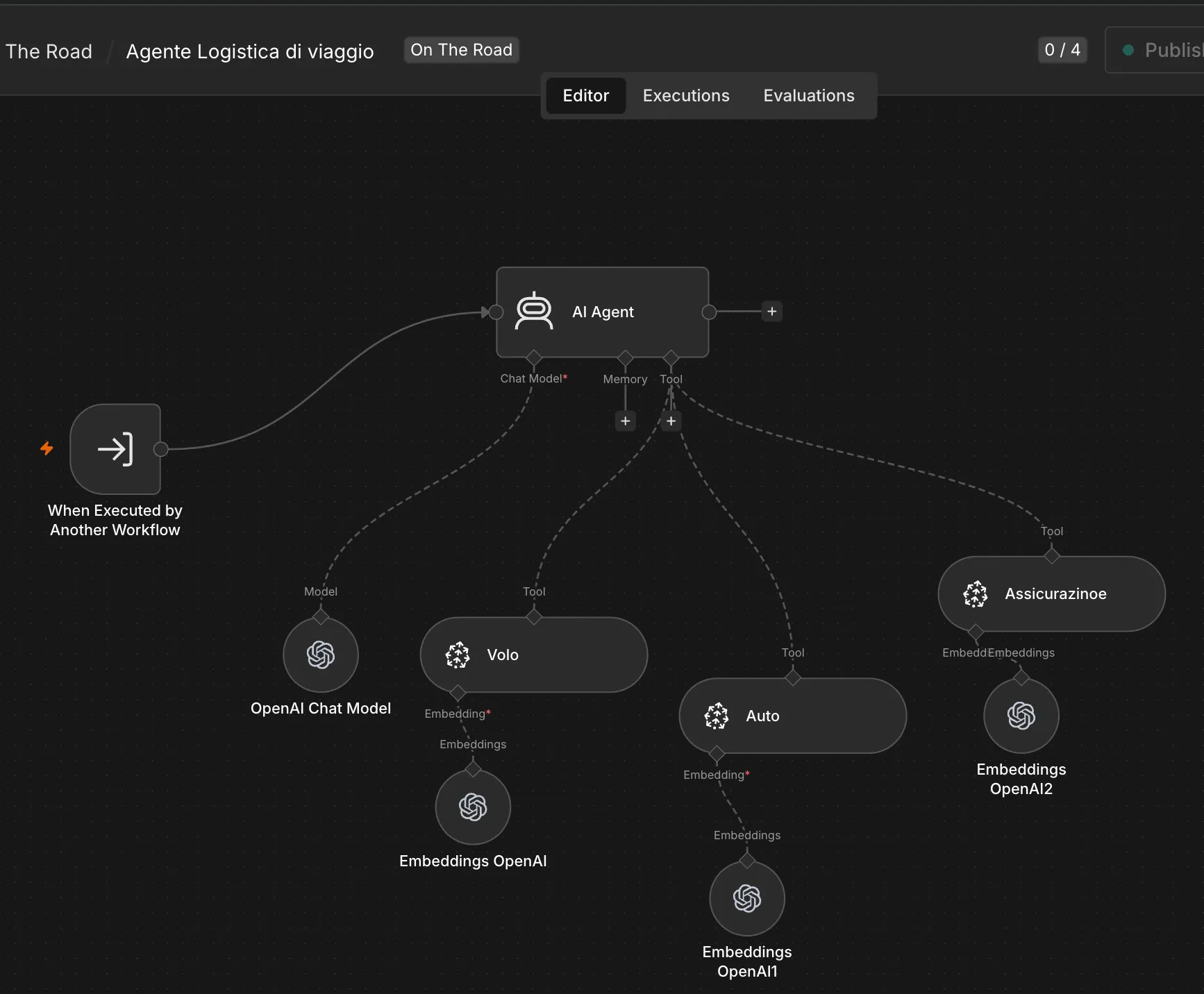
The screenshot still uses the original Italian labels from the n8n canvas, but the structure is the important part: the logistics agent is not reading one generic travel blob. It has separate retrieval tools for different operational contexts.
That separation is practical. It keeps the knowledge bases aligned with responsibility.
The hotel agent should know hotel bookings.
The logistics agent should know transport and insurance.
The main assistant should know the broader plan.
This reduces the temptation to build a giant prompt or a single overloaded document dump. The model still reasons, but the workflow decides where context should come from.
That is the practical value of RAG here: the agents are not only following instructions, they are retrieving trip-specific context at the moment they need it.
What n8n Added
n8n is often introduced as an automation tool.
In this experiment, I used it more like an agent operating room.
The useful parts were:
- a visible graph of responsibilities;
- workflow tools that can call other workflows;
- a chat entry point for interactive planning;
- memory for short conversational continuity;
- retrieval nodes for travel documents and bookings;
- a manual ingest path for updating the knowledge base.
The visual graph helped me reason about the system.
When the agents were only names in my head, the design was easy to blur. Once they became nodes and workflow tools, the architecture forced sharper questions:
- What does this agent own?
- Which information is it allowed to use?
- Should this be a prompt, a tool, or a knowledge base?
- Is the orchestrator deciding too much by itself?
- Is this concern reusable across multiple travel days?
Those are product design questions.
What Worked
The biggest improvement was the shift from asking for an answer to designing a process.
The system no longer treats a travel day as one undifferentiated request. It decomposes the day into parts:
- where are we?
- what is worth seeing?
- what is less obvious but interesting?
- what works with children?
- what does the route allow?
- where do we sleep?
- what practical risks should we prepare for?
- what should the day sound like?
That decomposition makes the output easier to inspect.
If the itinerary is too ambitious, I know where to look. Maybe the mainstream guide suggested too much. Maybe the children agent did not push back hard enough. Maybe logistics should have constrained the route earlier.
The workflow gives me places to improve.
That is a major difference from a single long prompt. A single prompt fails as a blob. A workflow fails in parts.
Parts can be fixed.
What Is Still Missing
The current setup is useful, but it still has obvious gaps.
The output should be more structured. A daily itinerary could have stable sections: route, timing, stops, child-friendly adjustments, hotel notes, logistics, weather, fuel and food warnings, and playlist.
Evaluation is also missing. I can read an itinerary and decide whether it feels good, but the system does not yet compare alternatives or score a day against constraints such as driving time, fatigue, weather risk, or child-friendliness.
The system would also benefit from saved examples. A few anonymized day plans would make it easier to compare changes over time and understand whether prompt edits are improving the result.
And, as always with travel data, privacy matters.
Bookings, exact dates, reservation details, private addresses, and family information do not belong in public examples. The architecture is publishable. The raw travel data is not.
Giving the Work a Shape
Agents become more useful when they have operational roles instead of vague personalities. In this experiment, the useful part is being able to describe how the itinerary should be produced.
I can separate mainstream advice from local curiosity. I can force family constraints into the process. I can keep logistics away from sightseeing. I can attach specific knowledge bases to specific responsibilities. I can inspect the workflow as a system instead of hoping one prompt will behave.
The workflow makes those responsibilities visible and gives me specific places to improve when an itinerary falls short.
References
Share