
Giving an Old Ubuntu PC a Second Life With Apache Guacamole
How I reused an aging x64 Ubuntu PC as a browser-accessible development machine with Apache Guacamole, without consuming more resources in my Proxmox homelab.
I have an Ubuntu computer that is no longer particularly new. I now use it as a development machine over SSH and, when I need the full desktop, through Apache Guacamole.
Its CPU, memory, and storage were sitting idle most of the time, even though they still had something to offer.
Meanwhile, I normally deploy my experiments in my Proxmox homelab. That is the right home for services I want to keep running: they get isolated environments, persistent storage, backups, and a clear operational model.
A development environment is different.
Creating another virtual machine in Proxmox just to write code, run builds, and try things out would consume resources on the server that hosts the rest of my home infrastructure. The old computer was already there and already paid for. Using it was effectively free.
So I decided to give it a second job.
From Old Laptop to Development Server
I started by enabling SSH and treating the Ubuntu computer as a development server.
That covered most of my daily work. From another machine I could clone repositories, edit code, run builds and containers, inspect logs, and leave long-running processes on the Ubuntu host. From a terminal, the age of the computer mattered much less. It was simply another Linux box on the network.
SSH also made the distinction between development and deployment clearer. Work in progress could live on this machine, while the experiments worth keeping could eventually move to Proxmox.
For many projects, a terminal is all I need. For some tasks, however, it is not.
I sometimes need to inspect a browser flow on the development machine, use a graphical tool, or interact with the complete desktop session. I could have installed an RDP or VNC client on every computer from which I wanted to connect, but that was not the experience I was after.
I wanted the Ubuntu machine to expose its desktop through a web browser, something every modern computer already has.
Guacamole as the Missing Layer
Apache Guacamole is a clientless remote desktop gateway. It connects to machines using protocols such as RDP, VNC, and SSH, then renders the session as an HTML5 web application.
In my setup:
- Ubuntu’s built-in GNOME Remote Desktop provides the graphical session over RDP;
- Guacamole connects to that local RDP service;
- I open Guacamole from a browser on another computer;
- no dedicated remote desktop client is required on that computer.
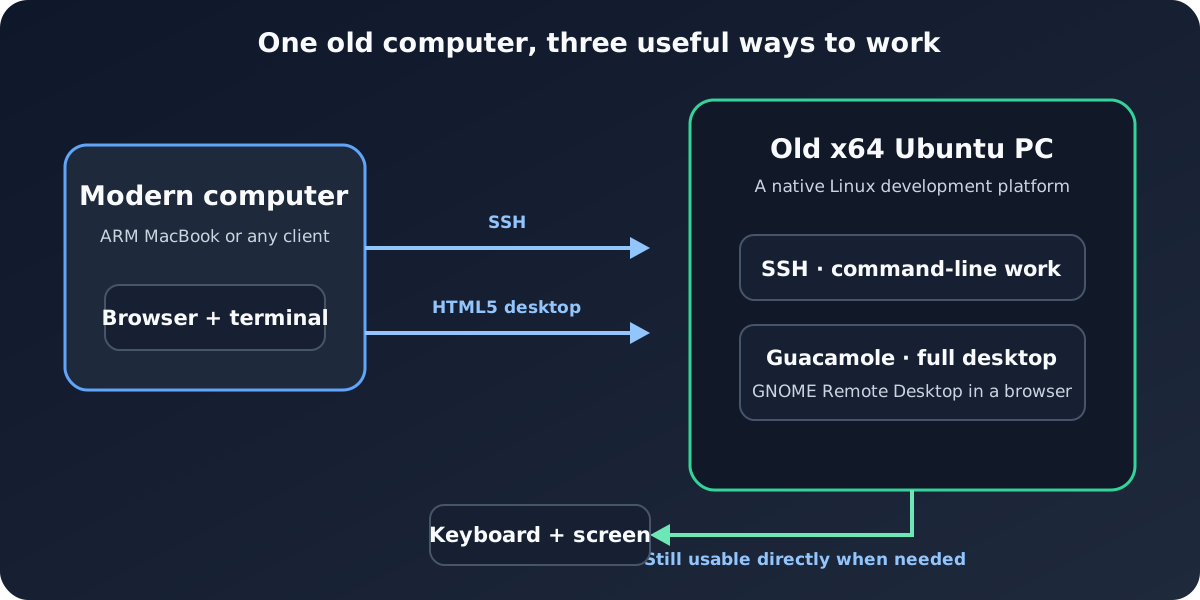
This was the missing piece. SSH remains my default interface, but the complete Ubuntu desktop is now available whenever the command line is not enough.
For the moment, Guacamole is reachable only from my home LAN. Making it safely accessible from elsewhere is a separate problem involving HTTPS and a proper access layer, not simply forwarding its port on the router.
A Hybrid Machine
A physical computer can play server and remain a normal computer.
Most of the time I can leave it connected to the network and use it remotely from a newer, faster machine. If I need direct access, however, I can still sit in front of it and use its keyboard, screen, and full desktop normally.
That makes it more flexible than a development VM hidden inside the homelab:
- it works as a headless development server over SSH;
- it becomes a browser-accessible graphical workstation through Guacamole;
- it remains a normal local Ubuntu computer when physical access is more convenient.
Guacamole lets the machine keep all three roles without requiring a different client setup for each computer I use.
An x64 Companion to an ARM MacBook
There is another benefit that has become increasingly important.
My everyday computer is a MacBook with an ARM processor. Apple Silicon is excellent for normal development work, but CPU architecture still matters. Some container images, binaries, virtualization scenarios, and low-level experiments expect an x64 Linux environment. Emulation and cross-platform images can help, but they are not always available and do not always reproduce the behavior of native x64 hardware.
The old Ubuntu machine gives me that platform.
Instead of forcing an x64 experiment into an ARM laptop or allocating another VM on Proxmox, I can run it natively on the Ubuntu computer. For compatibility work, its architecture can be more valuable than raw performance.
The two computers therefore complement one another: the MacBook is the modern, responsive client I work from every day; the Ubuntu PC is the native x64 Linux environment sitting behind a browser tab or an SSH session.
The Only Practical Problem: Wi-Fi
The weak link in daily use was the network.
I initially connected the Ubuntu machine over Wi-Fi. That was convenient, but the connection was not as stable as I expected. For an ordinary desktop, a brief wireless interruption is a minor annoyance. For a machine that is supposed to be continuously reachable over SSH or remote desktop, it undermines the whole idea.
I eventually connected it with an Ethernet cable.
That small change made the setup dependable. Remote access needs a predictable connection: the address must remain reachable, SSH sessions should not disappear, and the graphical desktop should be available when I need it.
Repurposing an old computer also depends on the hardware around it. If the machine is going to behave like infrastructure, its network connection has to behave like infrastructure too.
A Few Technical Edges
Guacamole itself runs as a small Docker Compose stack: the web application, the guacd protocol proxy, and PostgreSQL for users and connection configuration. I pinned the Guacamole components to version 1.6.0 and reused GNOME Remote Desktop rather than installing a second graphical server.
The host firewall was the only installation challenge.
The usual container bridge topology could not reach the RDP service on the Ubuntu host because of the interaction between Docker forwarding rules and the active firewalld configuration. I used host networking for the Guacamole components that needed local access, then narrowed every listener:
- PostgreSQL and
guacdlisten only on loopback; - the Guacamole web interface listens on the wired LAN address, on port
13006; - firewalld accepts that port only from my local subnet;
- RDP is never exposed as the browser-facing entry point.
There are also two separate logins. I first authenticate to Guacamole, then provide the GNOME Remote Desktop credentials when opening the desktop connection. I deliberately did not store the desktop password in Guacamole.
These choices kept the setup safe. I wanted to make an existing computer convenient enough to use again.
What I Gained
The result is modest, and that is why I like it.
I left the resources on my Proxmox host alone and avoided installing remote desktop software on every client machine. The setup combines things I already had:
- an aging but capable x64 computer;
- Ubuntu and GNOME Remote Desktop;
- SSH for the majority of development work;
- Guacamole for the moments when I need the graphical desktop;
- a browser on whichever modern computer happens to be in front of me.
The old Ubuntu computer now has a useful place between laptop and server. It is disposable enough for development experiments, independent from the resources of my Proxmox host, accessible from better hardware, and still available as a physical workstation. For this machine, that role keeps experimental work away from the infrastructure I rely on while giving me native x64 Linux over SSH or a browser.
References
Share