
Why My Home Assistant Automations Live in Node-RED
Why I use Home Assistant as the smart home system of record, but keep complex workflow logic, branching, timers, and JavaScript control in Node-RED today.
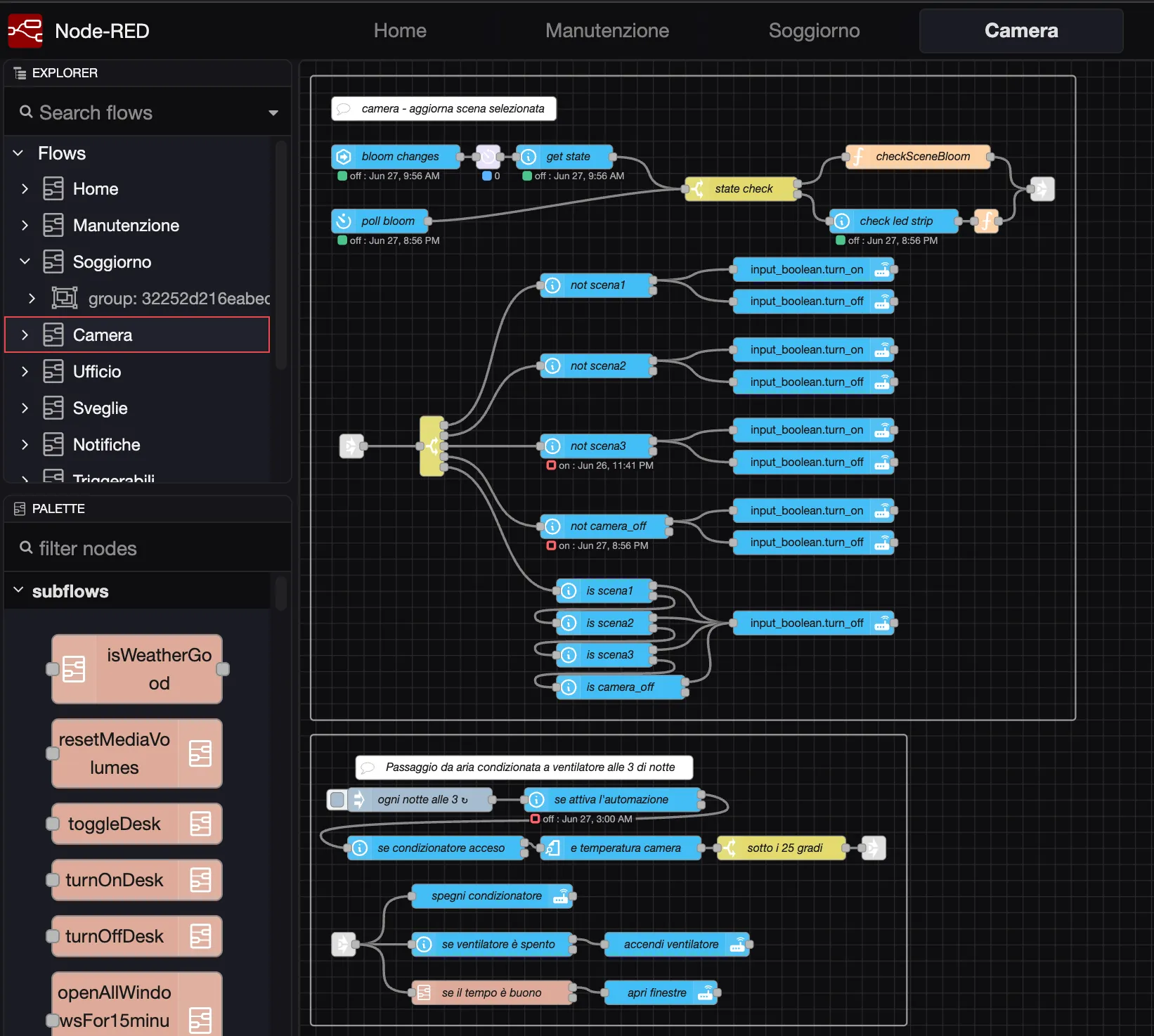
Home Assistant runs my smart home, but Node-RED runs the automation logic.
Home Assistant is still the center of the system. It knows about devices, entities, integrations, dashboards, scenes, history, and state. It is where the house becomes visible as a coherent system instead of a pile of vendor apps.
But the logic that decides what should happen next, when to branch, when to wait, when to notify, when to ignore a noisy sensor, and when to recover from an edge case lives somewhere else.
For me, that place is Node-RED.
The screenshot shows why I use Node-RED: the behavior is visible. I can see a state check, separate branches, helper updates, service calls, function nodes, a scheduled night routine, and a small decision tree that I can reopen months later and still understand.
This was not a philosophical decision at the beginning. It was a practical one.
When I started building more serious home automations, the Home Assistant automation interface was not pleasant for the kind of logic I wanted to model. Simple rules were fine. “When this happens, do that” was fine. But the moment an automation needed conditions, branches, timers, retries, helper states, and small bits of custom logic, the experience became awkward.
Node-RED gave me a visual workflow canvas, explicit branches, reusable subflows, debug nodes, and JavaScript function nodes when I needed exact control.
That was enough to change the architecture of my home.
When a Rule Becomes a Workflow
If all I needed were a few straightforward automations, I would probably keep them inside Home Assistant.
Turn on a light when motion is detected. Send a notification when a door opens. Close a cover at a fixed time. These are not hard problems, and Home Assistant can handle them well.
The problem starts when the automation stops being a rule and becomes a workflow.
In a real house, the interesting automations often look more like this:
- check whether a sensor crossed a threshold;
- make sure that state stayed true for long enough;
- verify that the house is in the right mode;
- update a helper so another part of the system knows what is happening;
- wait for a recovery condition;
- send a notification only to the right device;
- avoid repeating that notification too often;
- provide a manual action path;
- reset the state if the user handles the situation.
That logic forms a small state machine.
Home Assistant can express that kind of logic, especially today. The platform has improved a lot. The automation editor, script syntax, conditions, helpers, templates, traces, and troubleshooting tools are much better than they used to be.
But for the way I think about these automations, Node-RED still makes the shape of the logic easier to see.
Home Assistant Is the System of Record
Node-RED depends on Home Assistant doing the hard integration work.
Home Assistant gives me:
- device integrations;
- entity names;
- services;
- scenes;
- helper entities;
- dashboards;
- history;
- mobile app notifications;
- sensor state.
Node-RED consumes that world and orchestrates it.
In my setup, Home Assistant is the source of truth for what exists and what state it is in. Node-RED is the place where I model what should happen.
That separation has worked well because it keeps the two tools in roles that match their strengths.
Home Assistant is excellent at normalizing a messy smart home into a coherent entity model. Node-RED is excellent at making workflows visible.
The Value of a Visual Workflow
The main benefit of Node-RED is the fit between visual workflows and home automation problems. Avoiding code is not the goal.
A flow can show me:
- where a trigger enters;
- which conditions split the path;
- which helper states are read or updated;
- where a timer is involved;
- where a notification is sent;
- where a manual action comes back into the flow;
- where the flow ends.
That is valuable when the automation is operational.
I want to be able to open a flow after six months and understand why the house behaves in a certain way. I want to see whether the washer reminder logic is separate from the dryer reminder logic. I want to know whether a cover movement belongs to a wake-up routine, a night routine, or a temporary ventilation routine.
Node-RED makes that ownership visible.
It also makes debugging more natural. I can inspect messages moving through the flow, add debug nodes, disable small parts, and reason about the runtime path without reading a large YAML file from top to bottom.
That is not always necessary.
For a tiny automation, a visual flow can be more ceremony than value. But for automations that feel like processes, the canvas pays for itself.
JavaScript as the Escape Hatch
The other reason Node-RED fits my home is the function node.
Most of the time, visual nodes are enough. A state node, a switch node, a delay node, a call-service node, and a notification node can cover a lot of ground.
But real automations eventually need small decisions that are easier to express as code.
Sometimes I want to normalize a payload. Sometimes I want to calculate a threshold. Sometimes I want to build a message with a few conditional fields. Sometimes I want to keep the visual flow readable and place the fiddly logic inside one small JavaScript function.
That escape hatch matters.
It means the automation does not have to choose between being entirely visual or entirely code-based. The flow can stay visual at the process level, while JavaScript handles local precision where that precision is useful.
In my home, Node-RED is a lightweight workflow runtime with a visual editor and code blocks where needed.
The Laundry Flow Is the Best Example
The clearest example is laundry.
A washing machine is a surprisingly good test of home automation design.
The goal sounds simple: notify me when the washer is done.
A washer cycle does not produce a clean binary signal. It has power peaks, pauses, internal waiting periods, and low-power windows that can look like completion if the rule is too naive.
At one point, my washer notification was firing too early. The flow was interpreting a low-power pause inside the program as the end of the cycle.
The old rule was roughly:
start when power is above 100 W for a few seconds
finish when power is below 12 W for 4 minutes
That looked reasonable until it met the real appliance.
After looking at Home Assistant history for recent washer cycles, the pattern became clear: the washer could spend several minutes below the old completion threshold while still having a meaningful part of the program left.
So the Node-RED flow was tuned:
start when power is above 100 W for 120 seconds
finish only when power is below 8 W for 12 minutes
allow completion only after the washer has been running for at least 20 minutes
That is the kind of automation where I want the logic to be visible.
There is a start condition. There is a completion condition. There is a guard against short false cycles. There are helper entities that represent whether the washer is in progress and whether a reminder should be active. There is notification behavior. There is a reset path.
Could this be implemented in Home Assistant? Yes.
Would I rather maintain it as a Node-RED workflow? Also yes.
For this kind of operational logic, Node-RED matches the way I need to reason.
The Cost of This Choice
There is a real tradeoff.
If the active automation logic lives in Node-RED, a Home Assistant-only review is incomplete.
Looking only at Home Assistant automations would miss the actual behavior of the house. It would miss reminder flows, wake-up routines, cover logic, notification routing, and manually triggerable routines.
That means Node-RED becomes part of the system architecture, not an accessory.
The consequences are practical:
- helper entities in Home Assistant need stable names;
- renamed entities can break flows;
- notification services must be checked before removing mobile app registrations;
- Node-RED flows need to be documented;
- backups of the Node-RED data directory matter;
- operational ownership must be explicit.
I am comfortable with that tradeoff because I document the system as a homelab, not as a collection of hidden UI clicks.
The important part is knowing where the logic lives.
Would I Make the Same Choice Today?
Home Assistant has improved.
If I were starting from zero today, I would probably keep more simple automations inside Home Assistant than I did years ago. The editor is better. The scripting model is better. Home Assistant now documents stronger support for conditions, actions, automation modes, and troubleshooting traces.
But I would not migrate my house away from Node-RED just because Home Assistant got better.
My current setup is not an accident anymore. It is an architecture:
- Home Assistant is the smart home system of record;
- Node-RED is the automation runtime;
- helper entities are the contract between them;
- documentation keeps the ownership clear.
That architecture still makes sense because the automation logic in my home is closer to a set of workflows than a list of rules. Node-RED keeps those workflows visible.
Share