
Managing Nintendo Switch Screen Time with Home Assistant
A Home Assistant and Node-RED workflow that grants Nintendo Switch screen time explicitly, resets exceptions overnight, and keeps family rules visible.
I care about giving my children controlled and thoughtful access to electronic devices: explicit, visible, discussed, and easy enough to manage that the rule does not collapse because the tooling is annoying.
For the Nintendo Switch, I have always used the official parental control system. It is a good product for the basic job: define daily limits, suspend software when the limit is reached, and see how much time was used.
The operational friction around that rule was the problem.
The Small Failure Mode
Our baseline rule is simple: screen time is limited, explicit, and usually capped at one hour per day.
In Home Assistant, I model that by keeping the Switch daily limit at zero unless I deliberately grant time. Zero does not mean “the family rule is no games ever.” It means there is no active allowance carrying over inside the system.
Sometimes, though, the right answer is to give extra time.
Maybe it is a weekend. Maybe a child earned it. Maybe the family situation that day makes an exception reasonable. I do not think a parental-control system should make exceptions impossible. It should make them explicit.
But the Nintendo mobile app was often just inconvenient enough that the cleanup step was easy to forget.
If I added extra time on a specific day, I still had to remember to remove that extra time later. When I forgot, the next days could inherit a larger allowance than intended.
That is the subtle failure mode:
- the real family rule is “up to one hour per day, granted explicitly”;
- one day gets extra time for a good reason;
- the extra time remains configured;
- a few days later, the children unexpectedly have “free” time that nobody meant to grant.
It is a boring administrative mismatch between the rule and the interface.
Waiting for a Better Integration
For months, I wanted a cleaner way to connect this to the rest of my home automation setup.
I had looked at whether the Nintendo parental-control APIs could be reverse engineered, but that did not look like a comfortable or stable path. I did not want a brittle workaround around a private authentication flow just to manage my children’s screen time.
Then Home Assistant added an official Nintendo Switch Parental Controls integration.
That changed the shape of the problem.
The Switch became a normal set of Home Assistant entities:
- maximum screen time for today;
- used screen time;
- remaining screen time;
- per-user usage sensors;
- suspend-software switch;
- bedtime-related controls.
Once the rule became visible as Home Assistant state, it could also become part of the rest of my house logic.
The New Rule
The important automation is intentionally boring.
Every night at 4:00, Node-RED checks the current daily Switch limit.
If the Home Assistant limit is already zero, it does nothing.
If the Home Assistant limit is not zero, it sets it back to zero and makes sure “Suspend software” is enabled.
That last detail matters. I do not want unnecessary service calls, notifications, or noisy history when nothing has to change. The reset is idempotent: it enforces the base state only when there is actually something to reset.
I chose Node-RED for this because that is where most of my home workflow logic already lives. Home Assistant remains the system of record, but Node-RED is where scheduled checks, conditional branches, and small operational routines are easiest for me to reason about.
The result is simple:
- extra time can still be granted manually;
- the exception expires automatically overnight;
- the next day starts with no accidental allowance already configured;
- I do not have to remember the cleanup step.
That is the kind of automation I like most: modest and hard to forget.
How the Flow Works
The Node-RED flow is small enough that it does not need a complicated design.
It has four parts:
- a scheduled trigger at 4:00;
- a read of the current Nintendo Switch screen-time limit from Home Assistant;
- a conditional branch that stops immediately when the limit is already zero;
- two Home Assistant actions when cleanup is needed: reset the daily limit and enable suspend software.
The dashboard buttons use the same idea. They do not create a second policy layer outside Home Assistant. They just change the Nintendo Switch parental-control entities directly:
- “Add 30m” sets today’s limit to
used time today + 30; - “Add 1h” sets today’s limit to
used time today + 60; - “Reset time” sets today’s limit back to zero.
That is enough detail for me to trust the system later. I can open Node-RED, see the scheduled reset, and understand the whole thing without remembering a private script or a hidden side effect.
The Dashboard
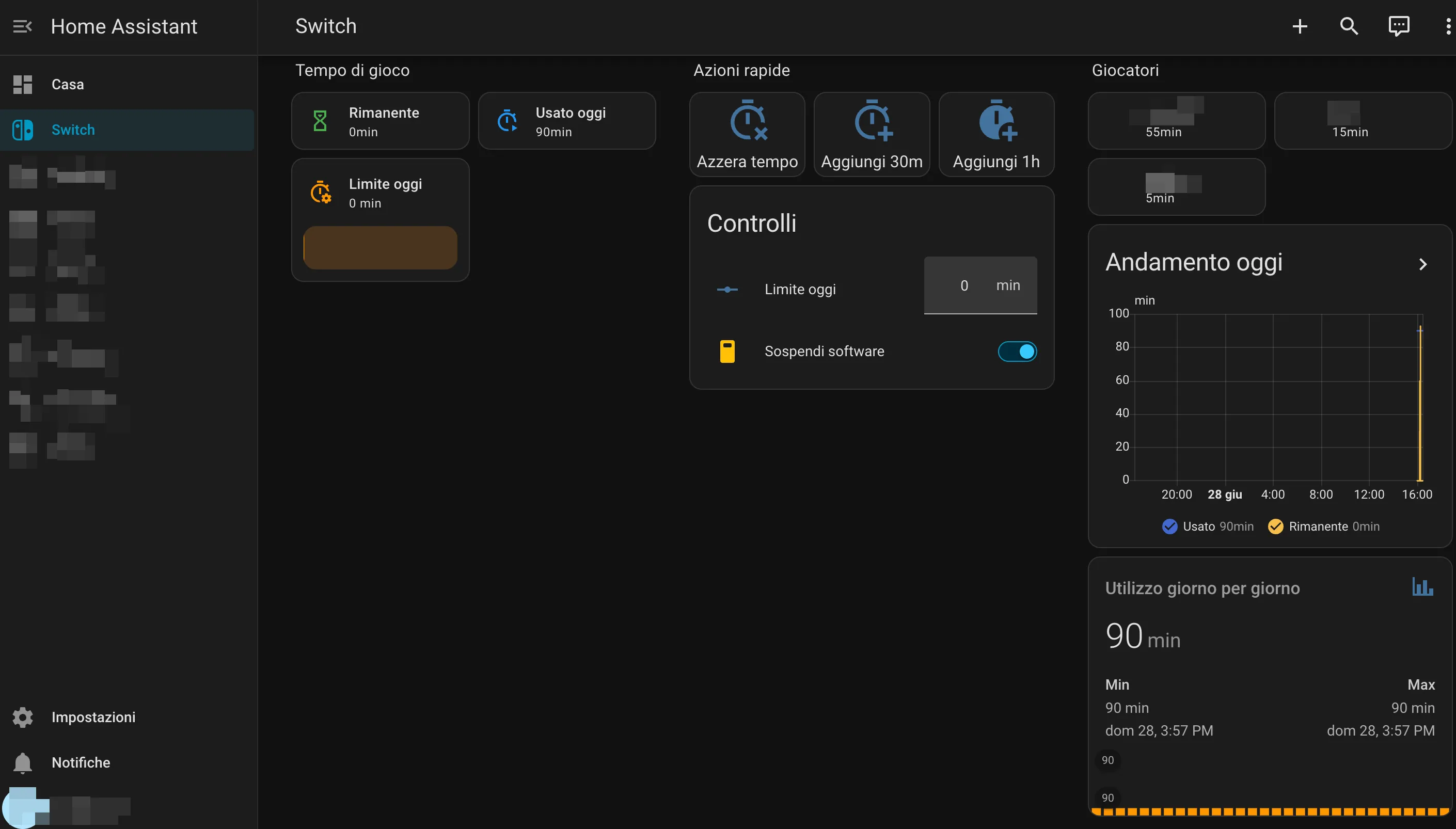
I also added a dedicated Home Assistant dashboard for the Switch.
The dashboard makes parenting decisions visible at the moment they happen.
The main controls are:
- remaining time;
- used time today;
- current daily limit;
- suspend-software status;
- quick actions to reset the limit;
- quick actions to grant 30 minutes or 1 hour;
- per-player usage;
- a day-by-day usage graph.
For my use case, the right model is to change the active allowed time directly.
The quick actions keep that decision close to the usage data, so the dashboard stays aligned with the rule I actually care about: how much time is actively allowed today.
Why This Feels Better
The system now matches how I want the rule to work.
Manual exceptions are still possible. They are just no longer sticky by accident.
I can give time when it makes sense, see the result immediately, and trust the nightly reset to remove the active allowance. I can also see usage over time without opening a separate mobile app.
That makes the rule more consistent, but also more humane.
I do not want screen time to be managed by memory, irritation, or surprise. I want it to be a small, visible part of the household routine.
Home Assistant makes the state of the house inspectable without making every decision automatic. Once the state is visible, a dashboard, a nightly reset, and a couple of explicit buttons are enough.
What I Would Not Automate
Adults should keep the judgment. The system should not negotiate with my children, let an AI decide whether someone “deserves” extra time, or hide rules that nobody in the family can understand.
The adult decides whether extra time makes sense. The automation only makes that decision easier to apply, inspect, and clean up afterward.
For this kind of household technology, that is the line I want to keep.
References
Share